Issue tracking with built-in team analytics
Track bug resolution performance across all your WordPress clients. See response times, SLA compliance, and team workload at a glance. Perfect for agencies managing multiple client sites.
Built for agencies who need visibility
WordPress maintenance teams
Track bug resolution times across all WordPress client sites. See which clients are waiting and ensure SLA compliance.
- →Response time per client
- →Overdue issues dashboard
- →Team workload distribution
Development agencies with Jira
Analytics that complement Jira. See client-facing metrics without exposing internal development complexity.
- →Client-specific reporting
- →Resolution time trends
- →Priority distribution
Freelancers managing clients
Prove your value with data. Show clients exactly how fast you respond and resolve their WordPress site issues.
- →Average response time
- →Resolution rate metrics
- →Client activity tracking
Real-time bug tracking analytics for agencies
Purpose-built issue tracking analytics for WordPress agencies. Track team performance, measure response times, identify bottlenecks, and see which clients need help. No spreadsheet exports required.
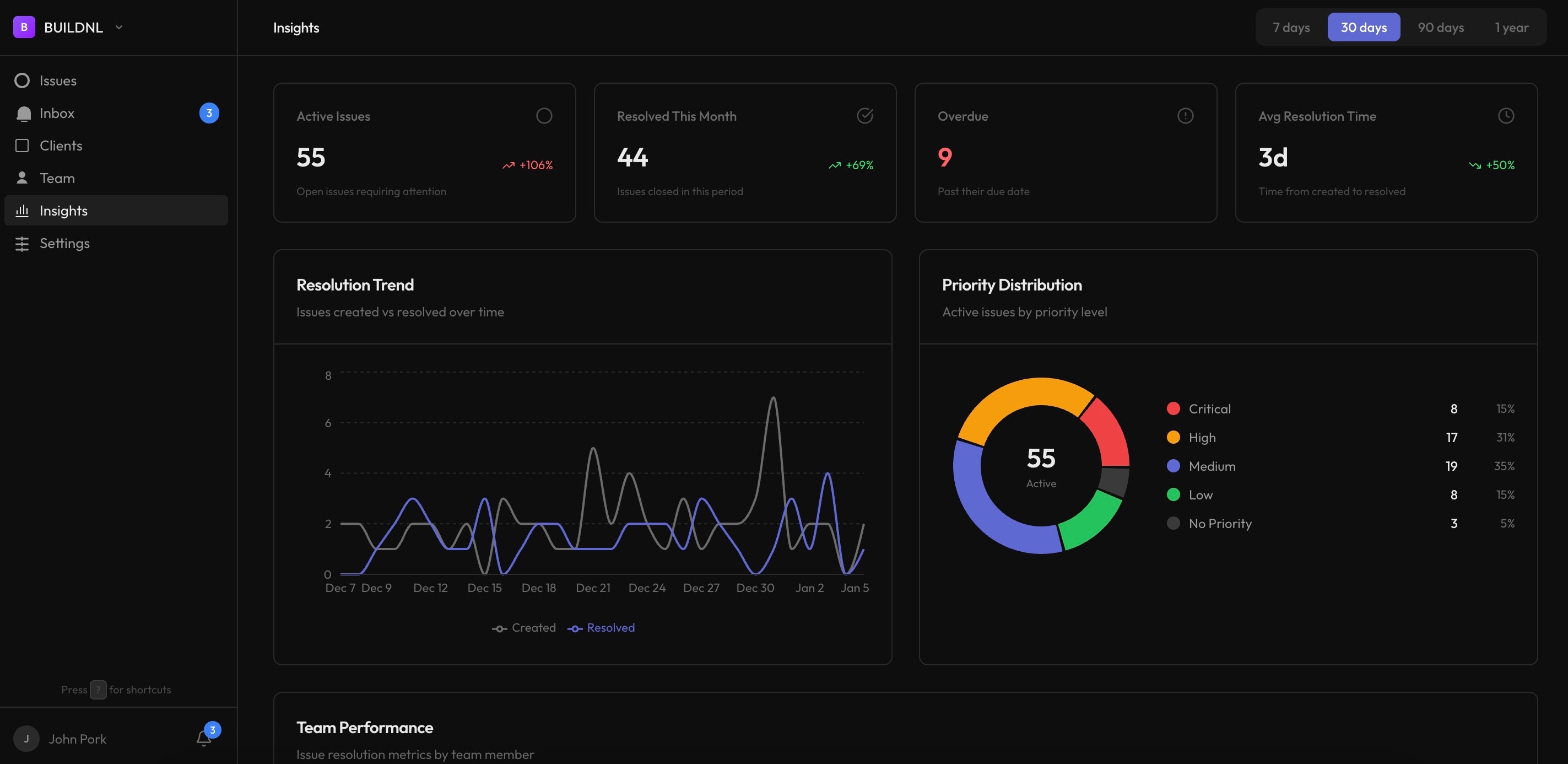
See what's happening at a glance
Get instant visibility into team performance, client activity, and issue resolution trends. No more guessing about who's busy, which clients need help, or how you're tracking against SLAs.
- Team performance metrics and trends
- Client activity and engagement tracking
- Resolution trends and SLA monitoring
- Priority distribution and workload insights
"The analytics dashboard shows us exactly where we need to focus. We can see which clients are waiting and which team members are overloaded."
Better than spreadsheet reporting
Most bug tracking tools don't show team analytics. You export to spreadsheets, waste hours building reports manually.
- ✗Export issues to CSV weekly
- ✗Build pivot tables in Excel
- ✗Email reports to clients manually
- ✗No real-time visibility
- ✗Can't track SLA compliance
- ✓Real-time analytics dashboard
- ✓Automatic performance tracking
- ✓Client-specific reporting built-in
- ✓SLA compliance monitoring
- ✓Zero manual data entry
How it works
Built-in analytics that automatically track and visualize your team's performance.
Automatic tracking
Every issue, status change, and resolution is automatically tracked. No manual data entry required.
Real-time insights
View performance metrics, trends, and distributions updated in real-time as your team works.
Frequently asked questions
Does this work with WordPress issue tracking?▼
Yes. Lantern is built specifically for agencies managing WordPress client sites. Track bugs across all your clients with automatic performance analytics showing response times, resolution rates, and team workload.
What metrics can I track for bug tracking performance?▼
Track response time (time to first reply), resolution time (time to mark resolved), bugs resolved per team member, activity by client, priority distribution, overdue issues, and SLA compliance rates. All updated in real-time.
Is this better than exporting to spreadsheets?▼
Much better. Real-time dashboards update automatically as your team works. No manual CSV exports, no pivot tables, no report building. Analytics are built-in from day one. Save 5-10 hours per week on manual reporting.
Can clients see these analytics?▼
No. Analytics are internal for your team. Clients see their bug portal with status updates. You see performance metrics across all clients in your team dashboard. Keep internal metrics private.
How do I track SLA compliance for multiple clients?▼
Set due dates on issues and Lantern automatically tracks on-time delivery percentage per client. See which clients are meeting SLAs and which are falling behind. Get alerts for overdue issues.
Start tracking your team's performance
Team analytics are included with every Lantern plan. See insights from day one.