Video bug tracking with screen recording
Stop playing telephone with clients. They record Loom videos showing exactly what's broken—no more "it doesn't work" tickets. See the issue, understand the context, fix it in one pass. Built for agencies tired of vague bug reports.
Stop asking clients "what did you do?"
Screenshot + vague description = 5 follow-up emails. Screen recording video = see exactly what happened in 30 seconds.
- ✗"It doesn't work" with one screenshot
- ✗Back-and-forth: "What did you click?"
- ✗Missing context (browser, steps taken)
- ✗Can't reproduce the issue
- ✗45 minutes to understand one bug
- ✓30-second screen recording shows everything
- ✓See exactly what they clicked and typed
- ✓Full context (browser visible, URL shown)
- ✓Reproduce in one attempt
- ✓5 minutes to understand and fix
Perfect for agencies with non-technical clients
Web development agencies
Clients can't describe technical problems. "The form doesn't work" could mean anything. Screen recording shows the exact error, what they entered, what they clicked.
- →See form submissions fail
- →Watch checkout errors happen
- →Identify browser-specific bugs
E-commerce maintenance
"Checkout isn't working" requires seeing the entire flow. Video walkthroughs show cart additions, payment inputs, error messages— everything needed to debug.
- →Full checkout flow visible
- →Payment gateway errors shown
- →Cart behavior captured
SaaS product support
Users report bugs without technical vocabulary. Screen recordings show their workflow, reveal edge cases, and make reproduction trivial for developers.
- →User workflows visible
- →Edge cases documented
- →Instant reproduction steps
Loom-powered bug tracking for agencies
Screen recording bug reports with Loom integration. Clients record 30-second video walkthroughs showing exactly what's broken—which buttons they clicked, what errors appeared, what they expected to happen. No follow-up questions needed.
See exactly what's wrong
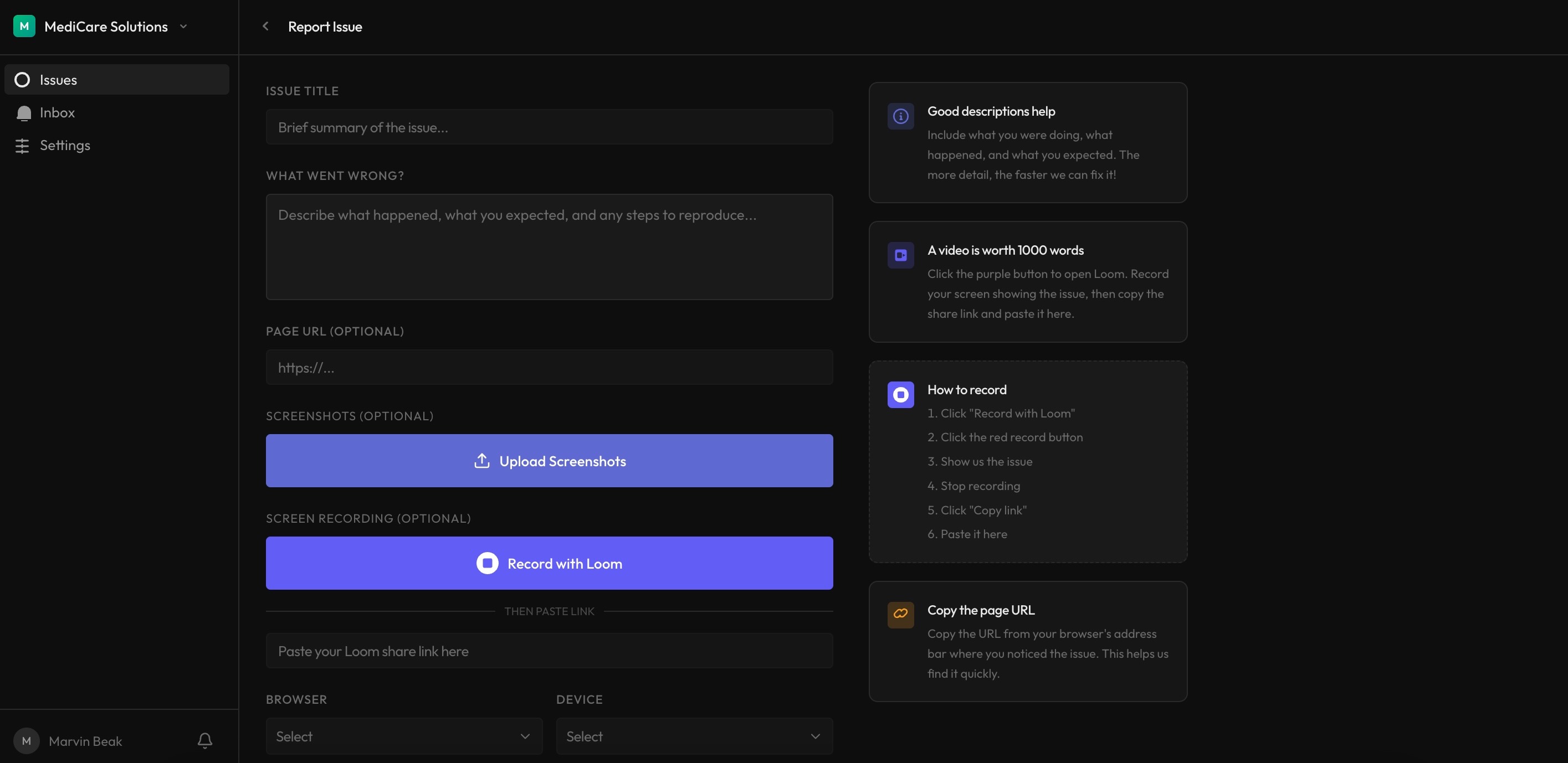
Clients record their screen showing the bug in action. No more back-and-forth emails asking "what happened?" or "can you describe it?" The video shows everything.
- Screen recording with audio narration
- Form encourages as much detail as possible
- Embedded directly in the issue
Fix bugs in one pass
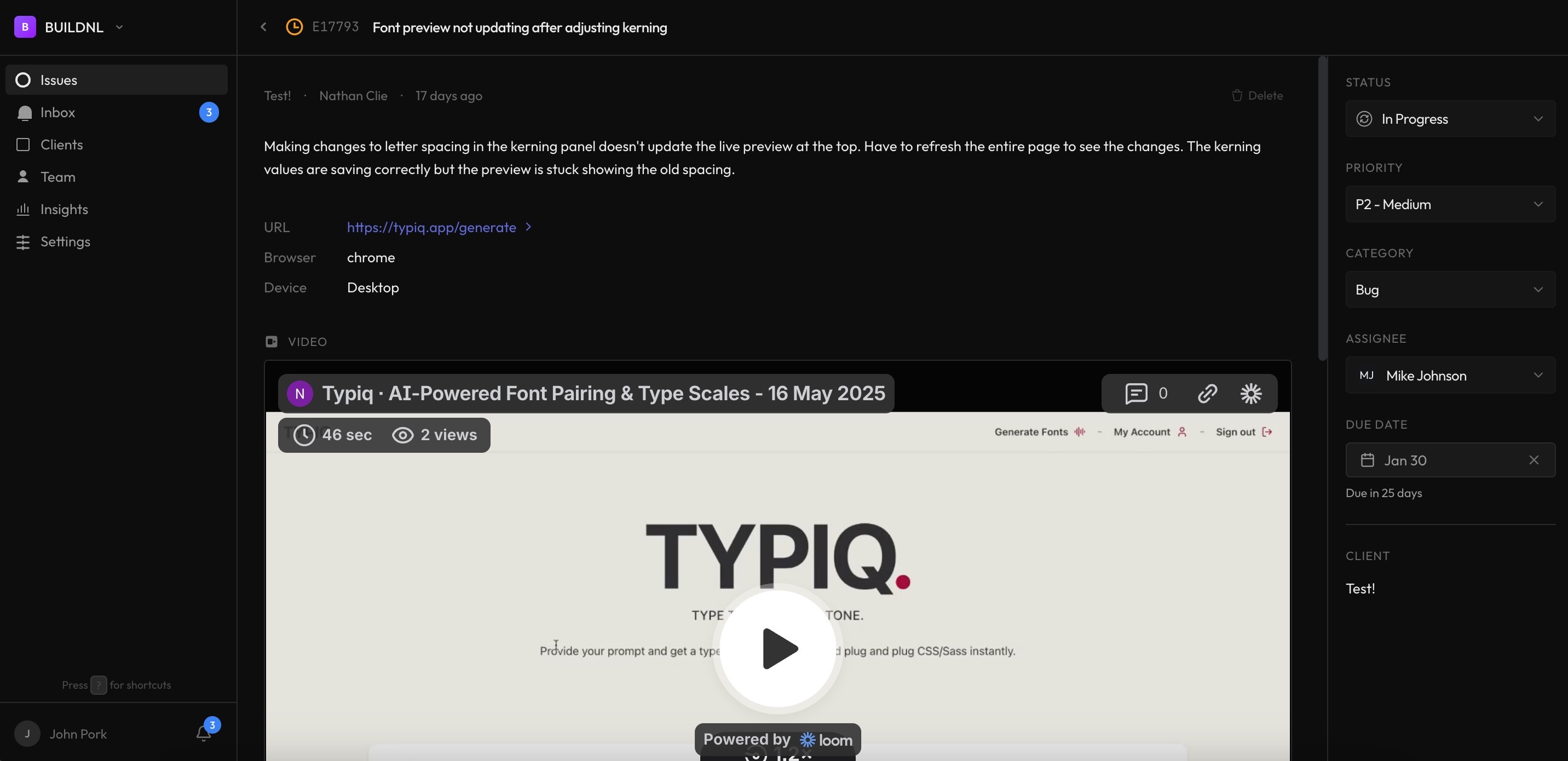
Watch the video, see the exact steps to reproduce, understand the context. No guessing, no follow-up questions. Fix the bug and move on.
- Step-by-step reproduction in video
- Form prompts for browser, device, and URL details
- No back-and-forth clarification needed
"Video bug reports cut our clarification time in half. Clients show us exactly what's wrong, we fix it, done."
How it works
Simple workflow that clients actually use. No complicated setup, no training required.
Client records video
Client clicks "Record with Loom" in the bug submission form. They record their screen showing the issue, add narration, and submit.
Video appears in issue
The Loom video is embedded directly in the issue. Your team watches it, sees exactly what's wrong, and fixes it.
Frequently asked questions
How do video bug reports work?▼
Clients click "Report Bug" in their portal, then "Record with Loom" to capture their screen. They show the bug happening—clicking buttons, filling forms, whatever triggers the issue. The Loom video embeds directly in the bug report. Your team watches it to understand the problem.
Do clients need Loom accounts?▼
No. Loom offers instant recording without signup. Clients click "Record with Loom", grant screen recording permission, record their screen, and submit. The video link is automatically included in the bug report. Zero account setup required.
Is video bug tracking better than screenshots?▼
Much better. Screenshots show one moment—the error screen. Videos show the entire sequence: what the client clicked, what they entered in forms, what error appeared, what browser they're using (visible in the video). You see reproduction steps automatically, no follow-up emails asking "what did you do before this?"
Can clients record bugs on mobile devices?▼
Loom screen recording works best on desktop browsers (Chrome, Firefox, Safari). For mobile bug reports, clients can still use text descriptions and screenshots. Most website bugs are reported from desktop anyway, where video recording works perfectly.
Does this work for WordPress bugs?▼
Yes. Video bug tracking works for any website—WordPress, custom builds, e-commerce, web apps. Clients record their screen showing the WordPress site, you see exactly what's broken. Perfect for plugin conflicts, theme issues, or any WordPress bug.
How long should bug report videos be?▼
Most effective videos are 30-60 seconds. Long enough to show the bug happening, short enough that watching doesn't take forever. Clients naturally record concise videos—they just want to show the problem and move on.
Can video bug reports sync to Jira?▼
Yes. When Jira integration is enabled, bug reports with video walkthroughs auto-create Jira tickets. The Loom video link is embedded in the Jira description so developers see the screen recording directly in their workflow.
Start using video bug reports
Video bug reports are included with every Lantern plan. No extra setup required.